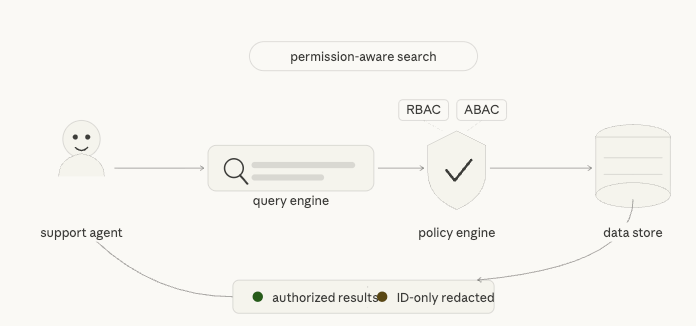
Search in enterprise applications is deceptively hard. The mechanics of finding records are straightforward, but doing it safely — respecting who should see what, across multi-tenant data, with natural language queries — is a different problem entirely. This post walks through the design of a pluggable, permission-aware search system built for internal support operations on sensitive orders and customers data.
The full source is available on GitHub.
The Core Problem
Internal support teams deal with a chaotic mix of query types: sometimes an agent pastes a raw order number, sometimes they type “show me open orders from this week for aster@example.com”, and sometimes they have no idea what they’re looking for and just want something to come back. The system needs to handle all of these without ever leaking data to an agent who doesn’t have permission to see it.
The design has five core goals:
- Low-latency search suitable for real-time support tooling
- Strict permission enforcement using both RBAC and ABAC, with deny precedence
- Redaction-safe UX — unauthorized matches surface as ID-only placeholders, not hard errors
- Pluggable internals — every major capability (rewrite engine, semantic layer, data store, policy engine) can be swapped without changing the public API contract
- Contract-governed fields — a schema registry controls which fields are accessible per API version and intent
Request Flow: From Natural Language to Authorized Results
Every query goes through a five-stage pipeline before a response is returned:
- Identifier resolution — If the query contains a structured token (order number, tracking ID, customer email, etc.), the system short-circuits to a fast path and skips NL processing entirely.
- Query rewriting — Otherwise, a rewrite engine converts the natural language query into a structured DSL (filters, sort, pagination, intent category).
- Semantic retrieval — A semantic provider (backed by embedding-based top-K over SQLite, or an external Superlinked service) refines filters and returns candidate IDs.
- Authorization — Each candidate is evaluated by the policy engine. ACL + ABAC rules determine allow or deny per document.
- Redaction — Authorized documents are returned in full. Unauthorized matches produce ID-only placeholders with a
reasonCodeandrequestAccessToken— no sensitive fields leak.
The Identifier Fast Path
One of the most impactful design decisions is treating identifier-heavy queries differently from natural language queries. A support agent pasting ORD-001234 doesn’t need semantic understanding — they need the record immediately.
The system classifies every incoming query into a queryShape before doing anything else:
identifier_token— looks like a structured ID; route to fast pathcontact_lookup— email or phone; route to contact fast pathtypeahead_prefix— short prefix; route to typeahead fast pathsentence_nl— full natural language; route to intent/semantic pathunsupported_domain— outside scope; return early with a clarification prompt
Detected identifiers are normalized (e.g., legacy field aliases like order_number are mapped to the canonical order.number contract field) and looked up in parallel across Orders and Customers.
The response includes a resultReasonCode that makes no-result states transparent:
VISIBLE_RESULTSMATCHES_EXIST_BUT_NOT_VISIBLENO_MATCH_IN_TENANTCLARIFICATION_REQUIRED
This gives the UI enough information to show the agent a helpful message instead of a blank result.
Query Rewriting with Enhanced SLM Prompting
For natural language queries, the system uses a small language model (Qwen 2.5 7B or Llama 3.1 8B via Ollama) to rewrite the user’s message into a structured query DSL. Getting this right at scale required moving beyond naive prompting.
Schema-Aware, Few-Shot Prompting
The rewrite engine now uses three composable components that build each prompt at request time:
- Schema Provider — supplies complete field definitions including types, operators, enum values, and which intents can access each field
- Example Provider — injects 18 curated few-shot examples across 4 intent categories (WISMO, CRM, Returns/Refunds, Default)
- Prompt Builder — assembles a ~2,362 token prompt with schema tables, examples, operator documentation, and explicit rules about what the model must not do
The improvement in accuracy after this change was substantial:
| Metric | Before | After | Delta |
|---|---|---|---|
| SLM overall accuracy | 60% | 92% | +32% |
| Filter field correctness | 70% | 95% | +25% |
| Repair success rate | 40% | 80% | +40% |
Intent Categories
The rewrite engine classifies every query into one of four intent categories, which control which fields are available in the resulting DSL:
wismo(Where Is My Order) — order state, shipment state, tracking ID, date rangescrm_profile— customer email/ID, VIP tier, email verification statusreturns_refunds— return eligibility, return status, refund statusdefault— minimal filters, low confidence; may trigger a clarification response
Fields not in the allowlist for a given intent are blocked with a FIELD_NOT_ALLOWED error before any retrieval happens. This keeps the authorization surface small and auditable.
The Schema Registry: Single Source of Truth
One of the most important architectural decisions is that all data-shape knowledge lives in a single place: internal/schema/ecommerce.go. No other file contains raw field names, table names, enum string literals, or identifier patterns as hardcoded constants.
The registry owns:
- Resource and table names (
order→orders_docs) - Canonical field names and their native SQL columns
- Enum values and enum role bindings
- Identifier patterns (e.g.,
ORD-\d{6}→(order, order.number)) - Intent-scope allowlists (which fields are visible per intent)
- Sort and filter metadata
The registry is built once at startup and injected into the contract validator, the identifier resolver, the semantic parser, and the SQLite adapter. Adding a new field means editing one struct — the adapter, validator, and SLM prompt all pick it up automatically.
Pluggable Architecture
The system is designed around interface boundaries that allow each layer to be swapped independently. The Search Orchestrator wires together six adapters:
- AuthAdapter — validates the calling user’s identity
- RewriteEngine — converts NL to DSL; currently routes between a deterministic rule-based parser, Qwen, and Llama with a configurable fallback chain
- SemanticProvider — performs embedding-based top-K retrieval; can point at the local SQLite mock or a real Superlinked service
- DataStore — retrieves candidate documents; SQLite adapter ships by default, MongoDB adapter is stubbed
- PolicyEngine — evaluates ACL + ABAC rules per document with an in-memory grants cache
- RedactionBuilder — constructs the authorized response and hidden placeholders
The Superlinked semantic provider supports three serving modes via config:
shadow— calls the provider but ignores its results (safe for initial rollout)gated— serves provider candidates only when confidence and latency thresholds passoff— disables the external provider entirely
Permission and Redaction Model
Authorization uses an ACL + ABAC model with deny precedence. If a user doesn’t have access to a document, the response never includes any field values — not even for “safe” fields like timestamps or states.
Unauthorized matches return only:
resourceIdreasonCoderequestAccessToken
This means the UI can accurately tell the agent “there are 3 more results you don’t have access to” without exposing anything from those records. Direct detail endpoints (GET /api/orders/{id}, GET /api/customers/{id}) always return 403 for unauthorized access — no partial data.
Running It Locally
The stack ships as three Docker images behind a single Compose file. The prerequisite is a local Ollama instance with the required models pulled:
ollama serveollama pull llama3.1:8b-instructollama pull qwen2.5:7b-instructollama pull nomic-embed-text
Then bring everything up:
make up-build
The UI runs on localhost:3000, the Go API on localhost:8080, and the Superlinked adapter on localhost:8081.
To smoke test the full pipeline:
curl -sS -X POST http://127.0.0.1:8080/api/query/interpret \ -H 'Content-Type: application/json' \ -H 'X-User-Id: alice' \ -H 'X-Tenant-Id: tenant-a' \ -d '{"message":"show open orders this week","provider":"slm-superlinked","contractVersion":"v2","debug":true}'
Debug Mode and Observability
The system ships with a first-class debug mode. When debug: true is set on /api/query/interpret, the response includes a full trace of the pipeline:
debug.traceId(also returned in theX-Trace-Idheader)debug.rewrite— the original message, generated DSL, detected intent, and resource typedebug.flow[]— a stage-by-stage timeline from ingress through to responsedebug.filterSource[]— per-filter attribution showing whether it came from the SLM, Superlinked, or both- Retrieval latency, fallback chain, and gate reason for the semantic provider
The Next.js UI surfaces all of this in a debug panel, making it practical to diagnose query quality issues without touching logs.
What I’d Do Differently
A few things that took longer than expected:
Prompt engineering takes real iteration. The jump from 60% to 92% SLM accuracy came entirely from building the schema-aware few-shot prompting infrastructure, not from switching models. Putting effort into the prompt builder early would have saved time.
The schema registry should have been the first thing built. Starting with hardcoded field names scattered across the codebase created a lot of refactoring work later. Centralizing into a single registry from the start pays for itself immediately.
The identifier fast path is worth the complexity. It might seem like an optimization, but it’s actually a correctness feature — support agents using structured IDs expect deterministic behavior, and routing them through an NL pipeline introduces unnecessary latency and failure modes.
What’s Next
A few areas worth exploring from here:
- A real-time streaming response mode for long-running queries
- Expanding the MongoDB adapter from stub to production-ready
- Automated replay benchmarking against real query CSVs to catch regressions in SLM accuracy
- Tighter integration between the policy engine and the SLM prompt — currently the model doesn’t know what the caller is allowed to see, which means it can generate filters for fields the user can’t access (caught at validation, but wasteful)
The full source, architecture notes, and implementation docs are on GitHub. Feedback welcome.


 Everyday Reflections
Leave a comment